Timewave v1.2

Introduction
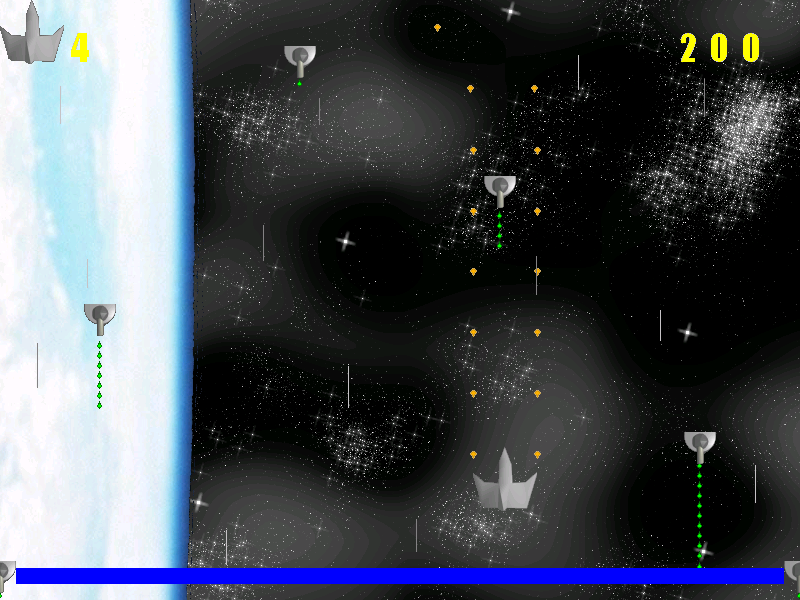
Timewave is a 2-d space shooter written in C++ using some of the freely available SDL libraries. It runs on Windows, Linux, and Mac OSX (10.4 or later). The object of this game is to fight through the mass of enemies in each level, defeat the level boss, and finally destroy the (well-armed) enemy space station far from Earth.

It has an interesting “twist” in which you can alter the flow of time. Build up your time meter by playing the game in fast-forward. Playing in slow motion affords you some extra maneuvering room but depletes the meter. If you achieve a high score, you can choose a color flag to represent your ship and have yourself recorded on the high score table.

This game is ‘freeware’ – you can download it and copy it around to anyone you like, you can even alter the graphics to better suit your tastes if you wish, but don’t pull my name off it and try to pass it off as your own work. You can’t get the source code though because it’s a total wreck. I may go and try cleaning it up later for a release, but until then, the binaries in the download should work just fine.

Screenshots
Last updated Aug. 7, 2007 – click for full-size
Recent Changelog

  • Reduction in resource file sizes: some items converted to 256-color, optipng and audio editing shaved further bytes.
  • Renamed hiscore.dat to config.ini, and added more options.
  • New command line options: -f (switch to Fullscreen mode), -c (Create Config: just write config.ini and exit), -w (switch to Windowed mode)
  • Added a “Change Keys” button which allows users to alter the inputs.
  • Added “Arcade Mode” switch to the config.ini file. This causes the game to simulate an arcade machine on Free Play: the title screen rotates with the high score table.
  • The arrow keys now drive the cursor on the high score color picker table.
  • Mac OSX port (PPC / Intel Universal Binary, 10.4 or greater).

Downloads
Last updated May 3, 2012

TI-83 Software

One Christmas in high school, I got a TI-GraphLink, allowing me to connect my TI-83 to my computer and transfer files between them. This was a great tool: now I could save my programs to the PC and no longer be at the mercy of memory resets from battery failure or an upcoming math test.

It also let me try out some Z80 programming, but I didn’t ever get too far with that. Hard-locking the calculator and forcing a battery pull was just too much of a hassle. I followed tutorials and had plans and sample code, but never pulled off a complete program.

All I have left now is just a handful of TI-83 BASIC programs. Sadly my GoldenEye 007 port is gone. I did find a couple of sprite pages for a work-in-progress “North and South” and “Smash Bros.” conversion, both would have been written in assembly and played over the link cable.

There is still “Fruity Vegas Slots”, my most polished game (a slot machine simulator). Also found Hearts (which used cards 2-14 instead of 2-10, J, Q, K, A), Bombs Away (clone of the Palm Pilot game “City Bomber”), a quadratic formula, and my own version of the classic “RACE”.

I deleted a couple of stupid inside-joke type programs and some WIP stuff. Nobody wants to see that : )

I have a lot of fond memories of working on this platform. The slow execution speed and laggy LCD screen reminded me a lot of working on other 8-bit systems, except this one was a handheld and had a wide user base of “everybody in school”. Built-in BASIC is such an endearing feature that I am surprised modern OSes don’t include something like it: QBasic and HyperCard, for instance, were both greatly loved and yet they’re both dead software.

Click here to download the complete package: ti83.tar.gz [2.88 KB]

Duplicate Image Finder (in Perl)

I have duplicate photos in my image library.  We all do.  I want to weed them out.  The trouble with using straight md5 for this, though, is that EXIF data on JPEG files may be altered by my photo management tool – thus they contain the exact same photo data, but the associated extra data (date/time, ICC profile, tags, etc) causes pure checksum comparison to fail.

Here’s a Perl script which iterates through a folder list and sends all files off for md5 digest.  However, any jp(e)g files are first run through jpegtran and saved as a temporary file, so they can be “normalized” (i.e. convert to optimized, progressive, and EXIF-stripped) so the md5 is performed on just image data.  This should find duplicates regardless of image program tampering.

#!/usr/bin/perl -w
use strict;

# path to jpegtran
my $JPEGTRAN_LOC = '/Users/grkenn/Pictures/jpegtran';

# Somewhat Advanced Photo Dupe Finder
# Greg Kennedy 2012

# Identifies duplicate photos by image data:
# strips EXIF info and converts to optimize + progressive
# before performing MD5 on image data

# Requires "jpegtran" application from libjpeg project
# Mac users: http://www.phpied.com/installing-jpegtran-mac-unix-linux/

use File::Find;
use Digest::MD5;

my %fingerprint;

my $ctx = Digest::MD5->new;

sub process
{
  my $filename = $_;

  # file is a directory
  if (-d $filename) { return; }
  # file is an OSX hidden resource fork
  if ($filename =~ m/^\._/) { return; }

  if ($filename =~ m/\.jpe?g$/i) {
    # attempt to use jpegtran to "normalize" jpg files
    if (system("$JPEGTRAN_LOC -copy none -optimize -progressive -outfile /tmp/find_dupe.jpg \"$filename\"")) {
      print STDERR "\tError normalizing file " . $File::Find::name . "\n\n";
    } else {
      $filename = '/tmp/find_dupe.jpg';
    }
  }

  # open file
  open (FP, $filename) or die "Couldn't open $filename (source " . $File::Find::name . "): $!\n";
  binmode(FP);
  # MD5 digest on file
  $ctx->addfile(*FP);
  push (@{$fingerprint{$ctx->digest}}, $File::Find::name);
  close(FP);
}

## Main script
if (scalar @ARGV == 0)
{
  print "Usage: ./find_dupe.pl [ ...]\n";
  print "\tjpegtran MUST be in the path,\n";
  print "\tor edit the script and set JPEGTRAN_LOC to an absolute location\n";
  exit;
}

find(\&process, @ARGV);

print "Duplicates report:\n";

foreach my $md5sum (keys %fingerprint)
{
  if (scalar @{$fingerprint{$md5sum}} > 1)
  {
    print "--------------------\n";
    foreach my $fname (@{$fingerprint{$md5sum}})
    {
      print $fname . "\n";
    }
  }
}

The output looks something like this:

macmini:Pictures grkenn$ ./find_dupe.pl test_lib/
Duplicates report:
--------------------
test_lib/ufo or moon.jpg
test_lib/subdirectory/dupe_7.jpg
--------------------
test_lib/too cool jenny.jpg
test_lib/subdirectory/dupe1.jpg
test_lib/subdirectory/dupe2.jpg

Atari Flashback 2 Mod

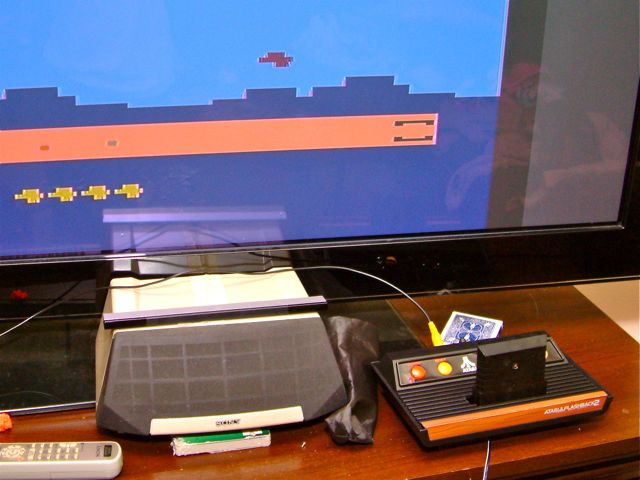
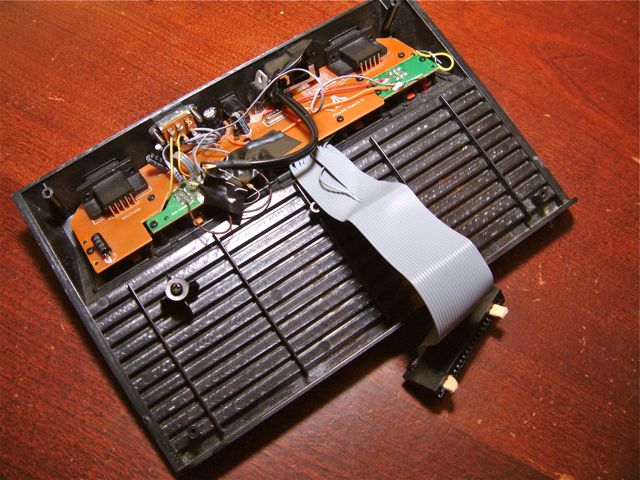
The Atari Flashback 2 is a really neat plug-and-play TV game system. It looks like a tiny Atari 2600 and plays 20+ classics for the system. Most interesting to hackers, however, is that the board inside isn’t just a 2600 emulator or recreation – it’s actually a modern, miniaturized 2600-on-a-chip playing real ROM images. Additionally, there is a convenient silkscreened table on the board showing pinouts for adding a 2600 cartridge connector and playing real VCS game cartridges on the system.  Compatibility isn’t 100%, but it’s quite accurate, and the A/V cable is a nice way to hook up to a modern TV (no more fiddling with RF adapters).

Finding a NOS cart connector is tough, but there’s an alternative: source a floppy-to-IDE cable from an old PC – the board connector has the same pin spacing as a cart.  I stuffed cut-down popsicle sticks into the gaps on either side (the connector is wider than a real 2600 cart).

Soldering to the board can be a real pain in the butt, especially if (like me) you don’t have a solder station to do it and are using a blunted Rat Shack iron for the job.  Miraculously, it all worked when I screwed it back together.  Besides the cartridge slot itself I added a few details:

  • Power light
  • Difficulty lights
  • Switch on back to select between “cart” and “built-in games”
  • Removed hardwired A/V cable and replaced with A/V jacks

Cutting the slot posed a new challenge, which I didn’t do a very good job of.  I drilled holes through the cart connector and used long bolts to secure it to the back of the system – carefully spaced so that the would slide into the tabs on the Atari cartridges and release the dust cover.  Then came time to cut a rectangular hole in the top.  I did this… and found I’d put it at the wrong spot.  So I had to cut another hole, leaving a gap around the cartridge and screwing the aesthetic.  This time I got it right and was able to play Star Wars: Empire Strikes Back on my big-screen TV.

Definitely not the most impressive Flashback 2 hack out there, but I’m pleased with the outcome.  Like most of my projects, this one dragged on for a couple of years before reaching a finished state – I’d throw a couple hours at it every few months but never seemed to get it wrapped up.  Now if I could just finish the multicart I’ve also been designing, I could have something to play on it.