Time-Lapse Photography

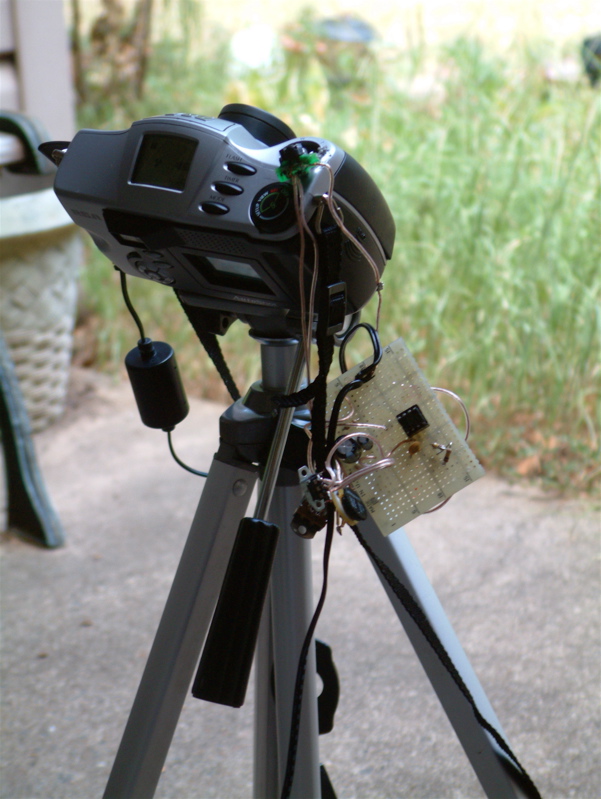
Intervalometer attached to camera, on a tripod, pointing at the sky

I’ve recently taken an interest in time-lapse photography. It’s a fun and easy aspect of photography to get involved with, and it has the potential to produce some interesting results. Plus, you don’t need a high-end camera to produce quality video: it only takes 1.6 megapixels (1440 x 1080) to assemble an HD-quality output file, which is available nowadays on many phone cameras.

I had a spare digital camera from 2001 handy: the RCA CDS6300, a 2.3 megapixel camera which is a real piece of junk. Mine has a broken battery door. On the plus side, it came with an AC adapter. So I built an intervalometer based on a 555 timer from a guide on Instructables. In the process of hacking the camera to attach the timer, I broke most of the inputs, so that it can now only be used to take time-lapse photos. It shoots 650+ images to a 256mb CF card as JPEG images, and then a bit of free software can be used to assemble these into a “motion JPEG” AVI video file (and add soundtrack if desired).

Despite the fragile build quality of the intervalometer, the mostly non-functional camera, and low quality still images – the resulting video still looks great. Here are a couple of sample videos.

A short time-lapse of clouds overhead, viewed from our front steps
Ice cube melting in a shallow bowl, one photo every 5 seconds.
Cantrell Airfield in Conway, AR visible in the distance and clouds rolling overhead

MAME Arcade Machine

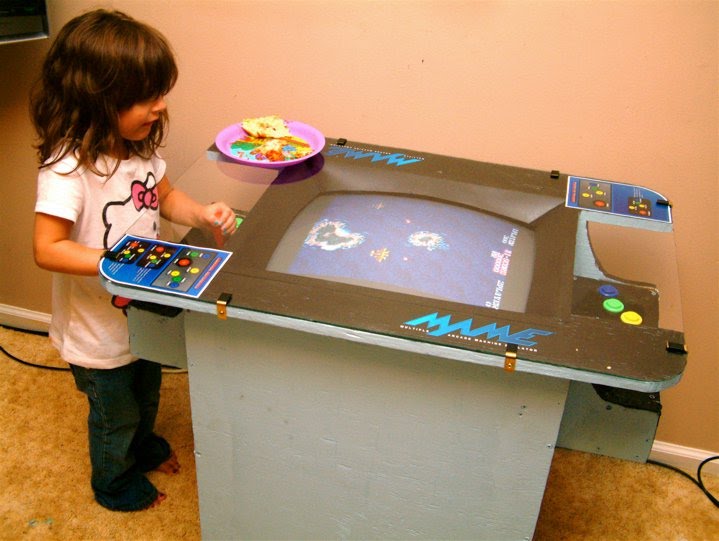
I’ve posted about this in several other places, so I’m not going to write a lot about it here.  I finished my MAME arcade machine.  It’s a cocktail table style, with a vertically oriented monitor.  It runs DOS and dosmame, and plays 729 games.

There’s a complete build write-up on a separate Google Sites page.  Click here to read it.

IMAP Webmail as File Storage

These days it seems like everyone is on the free web storage bandwagon, offering somewhere between tens of MB up to 2GB file storage and all kinds of options on how to share that with other people.  But remember back in the day when GMail was first lauched, and it was a hit because it offered 2 gigabytes of storage space where its closet competitors had only 10 megabytes free?

Well those inbox sizes have continued to grow, up to 7.5gb as of this writing.  GMail isn’t the only one with a big mailbox any more, but it’s certainly the most well-known.  What if you could convert that space into a web-based drive and store files into it?  Even at a 3-to-4 ratio (base64 encoding) you can still cram over 5gb into it, which is enough for many people to store a complete photo library, a document backup, etc.  Free offsite backup for just a bit of legwork.

This is a script called “mail-drive.pl” which does exactly that: it provides an interface to an IMAP mailbox and allows users to put, get, list or delete files from the store.  Individual files are broken down to smaller attachment sizes to fit into the mailbox on storage, and retrieved in the proper order when pulling to disk.  Using this, with a wrapper script in a cron job, will allow me to keep backups in a special gmail inbox which I can then get back later if I ever need it.  Free offsite backup!

FreeBSD Print Server

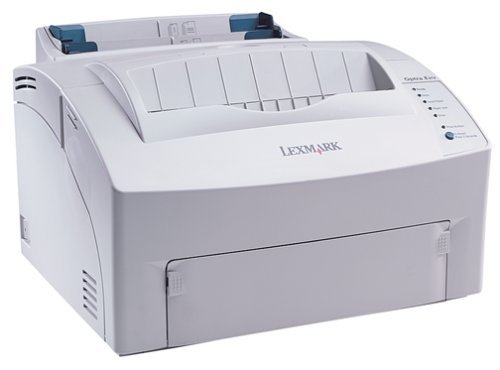
I scored a Lexmark Optra E312L laser printer off Freecycle yesterday.  For those who haven’t done the research, laser printers are THE WAY to go vs inkjets, maybe unless you print color.  Toner is multiple times cheaper and more convenient than ink cartridges plus it doesn’t dry up, and the printers themselves are built to last.

Okay, so now that I have a printer worthy of ownership, I want to share it with my house network so that I can print from any of the four computers here.  That means I want to add “print server” to the lengthy list of jobs my trusty FreeBSD box already handles.

Using lpd

There’s a few options when choosing a print spooler (the software that accepts, queues and dispatches jobs): you could use CUPS from Linux land, or LPRng or PDQ, but I went with the most basic of basic spoolers “lpd” because it comes prepackaged with FreeBSD.  So I started out by following the steps here, to add the Optra E312L as my sole line printer named “lp”:

http://www.wonkity.com/~wblock/docs/html/lpdprinting.html

Following these steps up to the “Adding A Printer” section got me printing ASCII without issue.  But when trying to use Postscript things fell apart, because the Optra E312L doesn’t understand PostScript – only PCL6 or newer.  Okay, so the solution to this is to get a “print driver” that can convert PostScript to PCL.  Solution: ghostscript.

cd /usr/ports/print/ghostscript8-nox11
make install clean

I disabled any X11 and CUPS features, enabled fontconfig and Freetype Bridge (no idea what that does but I do have FreeType already), left all the drivers enabled (compilation fails if you uncheck one of these but I don’t know which one it was) and let it go.  Once the job is complete, the “Adding A Filter” section of that tutorial is usable.  Great, now I have a PostScript-capable laser printer!

Printing from Clients

OSX threw a couple things at me that I was finally able to get around.  lpd opens up port 515 on the server – make sure to firewall this off from the Internet!  Open System Preferences, then Printing, click the plus sign to add a printer.  Click the IP tab.

  • Protocol is LPD
  • Address is 192.168.1.1
  • Queue Name is “lp” (without quotes)
  • Name is whatever you want – I picked “Lexmark Optra E312L”
  • Location is whatever as well – I picked “Server Closet”
  • Type is “Generic PostScript Printer”

Finally, lpd checks /etc/hosts.lpd for a list of who is allowed to print.  Ensure that your static IPs are loaded into /etc/hosts with names, then add the hostnames to hosts.lpd.  Send a test print from the Mac and pray for the best.

I have not tried to set up the printer from my Windows PC yet.
Euro1943 v1.1b

Introduction

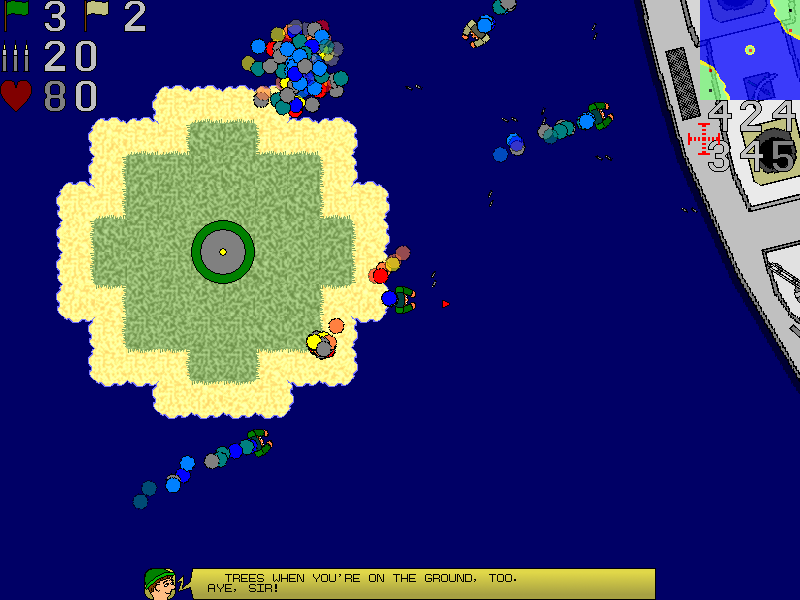
Join the Axis or the Allies in this multiplayer team-based action game. Pick up weapons to help you fight enemies and take over strategic capture points on the map. Climb into a tank, gunboat, or fighter plane and support the infantry on the ground. Or hop into the HQ and spend your team’s funds on weapons and vehicles for the players to use.

Euro1943 is a combination RTS/action game where players take on the role of both soldiers and generals. It was designed as an entry to the 4 Elements V contest at www.gamedev.net, where it took 7th place (out of 24 entrants). The README file contains gameplay information.

Please see LICENSE.TXT for more information about who can use this software, what you can do with it, etc. The long and short of it is that this is freeware, source code is not available (sorry, it’s a wreck), and I’m not responsible for what happens to your computer when using this software.

Screenshots

Downloads

Last updated Oct. 5, 2009